Content Cannibalization: How to Catch It Before It Tanks Your Rankings

Content cannibalization happens when multiple pages on your own website compete for the same keyword or search intent. Instead of one strong page ranking well, Google has to choose between your competing URLs—and it often chooses poorly. The result? Split authority, confused crawlers, and suppressed rankings across every page involved. You’re essentially arm-wrestling yourself while your competitors walk past you in the SERPs.
This isn’t a niche technical problem. It affects blogs that have published hundreds of posts over the years, e-commerce sites with overlapping category structures, and even lean websites where a landing page and a blog post accidentally target the same phrase. If you’ve ever watched a page mysteriously drop in rankings and couldn’t figure out why, content cannibalization might be the culprit.
What Is Content Cannibalization and Why Should You Care?
When two or more pages on your site target the same keyword—or satisfy the same user intent—Google faces a dilemma. Which page should it rank? Rather than consolidating all the ranking signals (backlinks, engagement metrics, topical authority) into one URL, Google splits them. Your pages end up competing against each other in what amounts to SERP self-competition.
The damage compounds over time. Link equity that should flow to one authoritative page gets diluted across two or three. Crawl budget gets wasted on redundant pages. And your click-through rate suffers because Google may surface the less relevant page for a given query, causing searchers to bounce.
Think of it this way: if you own two coffee shops on the same block, you’re not doubling your customer base. You’re splitting it.
How SERP Self-Competition Differs From Duplicate Content
People often confuse keyword cannibalization with duplicate content SEO problems, but they’re distinct issues. Duplicate content means two pages contain identical or near-identical copy—Google may filter one out or apply a penalty. Cannibalization is subtler. Your pages can have completely unique content and still cannibalize each other if they target the same keyword or intent.
A 2,000-word buyer’s guide and a 500-word FAQ page might share zero sentences in common. But if both are optimized for “best running shoes for flat feet,” they’re cannibalizing. Google sees two pages from the same domain trying to answer the same question, and it has to pick one. Sometimes it picks wrong. Sometimes it alternates, which is even worse for your rankings stability.
Real-World Signals That Your Pages Are Competing Against Each Other
You won’t always get a warning. But these symptoms point to URL overlap:
- Ranking fluctuations: The same keyword bounces between two or more of your URLs week to week. One week your blog post ranks #8, the next week your service page takes that spot at #14.
- Google indexes the wrong page: You want your product page to rank, but Google keeps surfacing your old blog post instead.
- Declining CTR with stable impressions: Your impressions hold steady, but clicks drop because Google is showing a less compelling page.
- Position volatility in Search Console: You filter by a keyword and see multiple URLs pulling impressions, none of them ranking consistently.
If you spot two or more of these patterns, you’ve got a cannibalization problem worth investigating.
How to Detect Keyword Cannibalization Step by Step
Diagnosis before treatment. Here’s how to run a cannibalization audit, from quick checks anyone can do to more systematic approaches.
Using Google Search Console to Spot URL Overlap
Google Search Console is your first stop. Open the Performance report, click on a query you care about, then switch to the Pages tab. If you see multiple URLs pulling impressions for that single query, you’ve found potential cannibalization.
Pay attention to:
- Impression distribution: Are impressions split roughly evenly, or does one URL dominate? An even split is a stronger cannibalization signal.
- Position volatility: Click into each URL’s performance over time. If positions swing wildly—say, between #5 and #25—Google is likely uncertain about which page to rank.
- CTR disparities: A URL with high impressions but unusually low CTR may be the “wrong” page Google is choosing to display.
Export this data for your top 50-100 keywords. Sort by query and look for any keyword associated with more than one URL. That’s your hit list.
Site-Search Operators and SERP Checks
For a faster (if less precise) check, type this into Google:
site:yourdomain.com "target keyword"
The results show you every indexed page Google associates with that phrase. If you see three blog posts and a landing page all appearing, you’ve got overlap. The order Google returns them in gives you a rough sense of which page it currently prefers—but that preference can shift.
This method works well for spot-checking specific keywords you’re worried about. It’s not scalable for hundreds of terms, but it takes 10 seconds and requires zero tools.
Building a Keyword-to-URL Mapping Spreadsheet
This is the single most effective preventive measure against cannibalization, and almost nobody does it.
Create a spreadsheet with three columns:
| Target Keyword | Assigned URL | Search Intent |
|---|---|---|
| content cannibalization | /blog/content-cannibalization-guide | Informational |
| fix keyword cannibalization | /blog/content-cannibalization-guide | Informational |
| content audit checklist | /blog/content-audit-checklist | Informational |
| SEO content services | /services/content-strategy | Transactional |
Every keyword gets exactly one URL. No exceptions. Before anyone on your team publishes a new piece, they check this map. If the keyword is already assigned, the new content either targets a different keyword or gets folded into the existing page.
This document becomes your source of truth. Keep it updated, and you’ll catch cannibalization before it starts rather than after it’s already cost you rankings. If you’re managing an active Blog, this kind of mapping is non-negotiable.
Five Proven Fixes to Resolve Cannibalized Pages
You’ve found the problem. Now here’s how to fix it—matched to the specific situation you’re dealing with.
Consolidate and Merge Thin or Overlapping Articles
This is the right move when you have two or more weak pages that would be stronger as one. Maybe you published “10 Tips for Email Subject Lines” in 2021 and “How to Write Better Email Subject Lines” in 2023. Neither ranks well. Combined, they’d be comprehensive.
Here’s the process:
- Pick the winner: Choose the URL with more backlinks, better historical performance, or the cleaner URL structure.
- Merge the content: Pull the best sections from each page into the winning URL. Don’t just paste them together—rewrite for flow and eliminate redundancy.
- Set up 301 redirects: Point the retired URL(s) to the consolidated page. This transfers link equity and prevents 404 errors.
- Update internal links: Any pages linking to the old URL should be updated to point directly to the new one. Redirect chains slow things down.
According to Google’s own documentation on redirects, 301s pass the majority of ranking signals to the destination URL, making this the cleanest approach for consolidation.
Differentiate Intent With Sharper Keyword Targeting
Sometimes both pages deserve to exist—they just need clearer separation. A blog post answering “what is content cannibalization” serves informational intent. A service page offering cannibalization audits serves transactional intent. Both can coexist if they’re properly differentiated.
To pull this off:
- Rewrite title tags and H1s so each page targets a distinct keyword variation. “What Is Content Cannibalization?” vs. “Content Cannibalization Audit Services.”
- Adjust on-page copy to lean harder into each page’s unique intent. The informational page goes deep on explanation and examples. The transactional page focuses on outcomes and CTAs.
- Differentiate meta descriptions to attract different searcher mindsets.
The key question: would the same person searching the same thing find both pages equally relevant? If yes, you still have a cannibalization problem. If no, you’ve successfully differentiated.
Use Canonical Tags and Internal Linking to Signal Priority
When you have supporting content that overlaps with a primary page but you don’t want to delete it, canonical tags and internal linking work together to tell Google which URL matters most.
A rel="canonical" tag on the supporting page points to your preferred URL, signaling that the canonical page should receive ranking priority. This is useful when you have, say, a comprehensive guide and a shorter FAQ that covers similar ground—you want both accessible to users but only the guide competing in SERPs.
Pair this with strategic internal linking. Every time you mention the topic across your site, link to the primary page. This funnels authority consistently and reinforces Google’s understanding of your site hierarchy. Your Welcome page and other hub pages should link to your most important content, not to every tangential piece that touches the same topic.
De-Index or Noindex Low-Value Competing URLs
Sometimes a page just isn’t pulling its weight. It has no backlinks, minimal traffic, and its content is better covered elsewhere on your site. Adding a noindex directive removes it from Google’s index while keeping it accessible to users who land on it through internal navigation.
When to noindex vs. delete and redirect:
- Noindex when the page still has utility for users (internal reference, customer support documentation) but shouldn’t compete in search.
- Delete + 301 redirect when the page serves no purpose at all. Redirect it to the most relevant surviving page.
Don’t noindex pages that have earned backlinks. You’d be throwing away link equity. Redirect those instead.
Restructure Your Content Hub Architecture
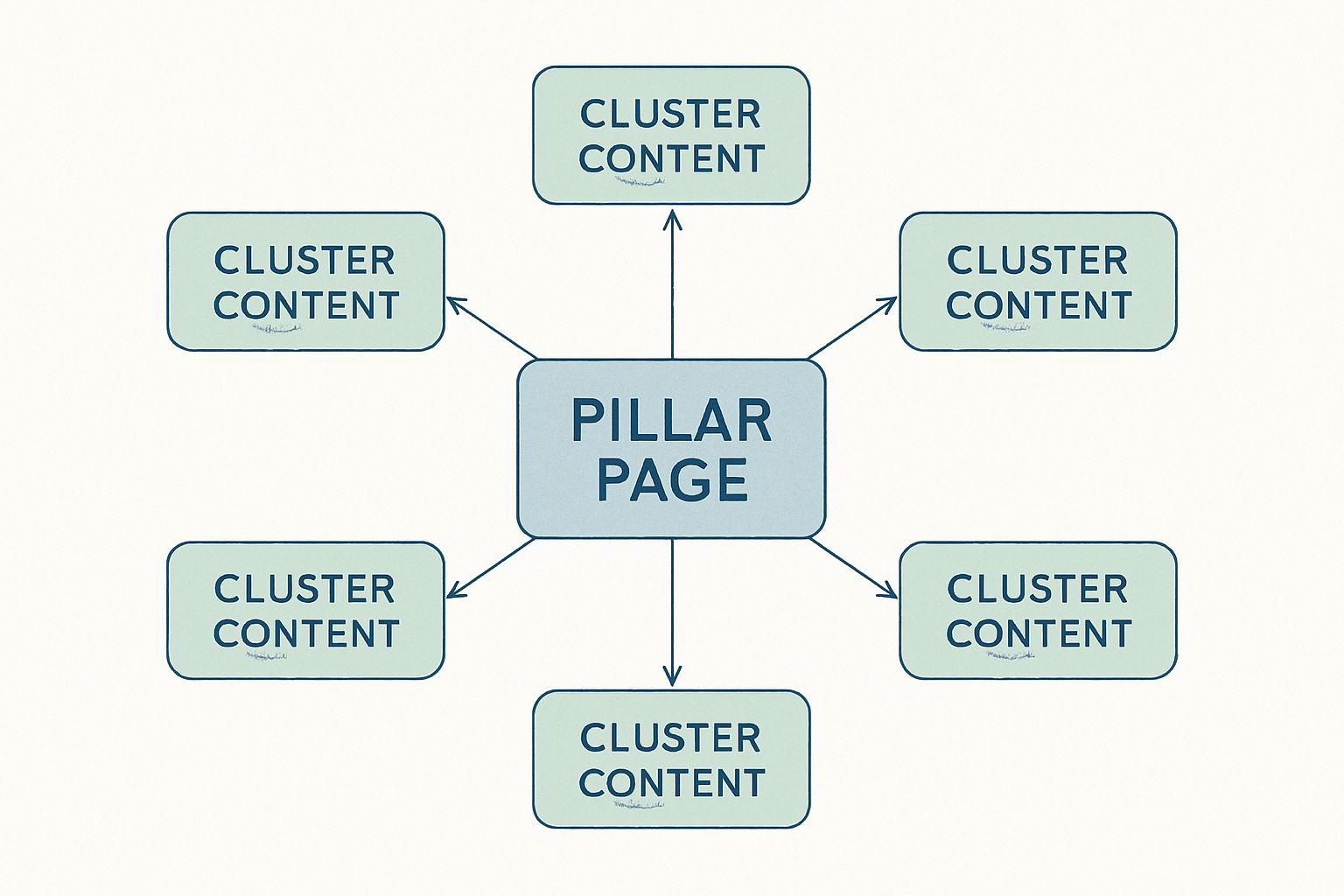
If cannibalization keeps recurring, the problem is structural. A pillar-and-cluster content model prevents overlap by design.
Here’s how it works:
- Pillar page: One comprehensive, authoritative page on a broad topic (e.g., “Content Cannibalization: The Complete Guide”).
- Cluster pages: Supporting articles that each target a specific subtopic or long-tail keyword (e.g., “How to Use Canonical Tags,” “Content Audit Checklist,” “Keyword Mapping for SEO”).
- Internal links: Every cluster page links back to the pillar. The pillar links out to each cluster. No cluster page targets the pillar’s primary keyword.
This architecture creates clear topical hierarchy. Google understands which page is the authority and which pages support it. Cannibalization becomes structurally difficult because every new piece of content has a defined place in the hierarchy before it’s written.
Preventing Future Content Cannibalization Before You Publish
Fixing existing cannibalization is necessary. Preventing it is smarter.
Integrating Cannibalization Checks Into Your Content Calendar
Before any new piece gets a green light, run through this pre-publication checklist:
- Search your own site: Use
site:yourdomain.com "target keyword"to check for existing coverage. - Check the keyword-to-URL map: Is this keyword already assigned? If so, should the new content update the existing page instead?
- Verify intent differentiation: If overlap exists, confirm the new piece serves a genuinely different search intent.
- Review Search Console data: Are any existing pages already pulling impressions for this keyword? If they’re ranking well, a new page could do more harm than good.
Build this into your editorial workflow as a gate. No piece moves to drafting until these checks are complete. This is especially critical for teams publishing content at scale through a Blog or content hub.
Quarterly Content Audits to Keep Your Site Clean
Cannibalization creeps in over time. A quarterly audit catches it before the damage accumulates.
Each quarter, review:
- New cannibalization signals in Search Console (keywords with multiple URLs pulling impressions)
- Outdated content that now overlaps with newer, better pages
- Consolidation opportunities where two underperforming pages could become one strong one
- Keyword-to-URL map accuracy to ensure it reflects your current site structure
A site that published 200 posts over three years will almost certainly have cannibalization issues it doesn’t know about. The audit finds them. Block two hours every quarter and treat it like routine maintenance—because that’s exactly what it is.
Frequently Asked Questions About Content Cannibalization
Can Content Cannibalization Happen With Different Content Formats?
Yes. A blog post, a landing page, a FAQ section, and even a PDF can all cannibalize each other if they target the same keyword and satisfy the same search intent. Format doesn’t protect you—intent overlap is what matters.
Does Cannibalization Always Hurt Rankings?
Not always. In rare cases, two pages from the same domain rank on page one for a high-volume keyword, effectively giving you double the SERP real estate. But this is the exception. In most scenarios, especially for competitive keywords, cannibalization splits your authority and neither page ranks as well as a single consolidated page would.
Is Keyword Cannibalization the Same as Keyword Stuffing?
No. Keyword stuffing is an on-page problem—cramming a keyword into a single page unnaturally. Keyword cannibalization is a site-architecture problem where multiple pages across your site compete for the same term. Different issues, different fixes.
How Long Does It Take for Google to Reflect Cannibalization Fixes?
It varies. Canonical tag changes can take effect within days once Google recrawls the page. 301 redirects typically settle within two to four weeks. Major content consolidations—where you’re merging pages and restructuring internal links—can take four to eight weeks to fully stabilize in SERPs. Patience is part of the process.
Should I Delete or Redirect a Cannibalized Page?
It depends on the page’s assets. If it has backlinks or meaningful traffic, redirect it with a 301 to preserve that value. If it has no backlinks, no traffic, and no historical significance, deletion is cleaner. For pages that serve users but shouldn’t rank, a noindex tag is the middle ground.
Can E-Commerce Category Pages Cannibalize Product Pages?
Absolutely. This happens frequently when category pages are optimized for the same long-tail keywords as individual product listings. The fix is intent separation: category pages should target broader, navigational terms (“women’s running shoes”), while product pages target specific, transactional terms (“Nike Air Zoom Pegasus 40 women’s size 8”). Keep the keyword targets distinct and the cannibalization disappears.
What Tools Help Identify URL Overlap at Scale?
Rank tracking platforms that monitor keyword-to-URL associations over time are the most efficient option. Site crawlers can flag pages with similar title tags and meta descriptions. Search Console data exports, filtered and sorted in a spreadsheet, remain one of the most reliable free methods. But no tool fully replaces manual intent analysis—automated systems can spot keyword overlap, but only a human can determine whether two pages truly serve the same intent.
Stop Competing With Yourself and Start Climbing the SERPs
Every day your site has unresolved cannibalization, you’re leaving rankings on the table. The fix doesn’t require a massive overhaul. Start with the keyword-to-URL mapping spreadsheet—it takes an afternoon and immediately clarifies where your overlaps are. Then work through the fixes that match your situation: merge what’s weak, differentiate what’s worth keeping, redirect what’s redundant.
Commit to quarterly audits. Make cannibalization checks part of your pre-publication workflow. These aren’t dramatic interventions—they’re habits that compound over time, the same way cannibalization problems compound when you ignore them.
Your pages should be working together, not fighting each other. Fix the infighting, and the rankings follow.