Finding Low-Hanging Fruit SEO Opportunities in Google Search Console: A Step-by-Step Method
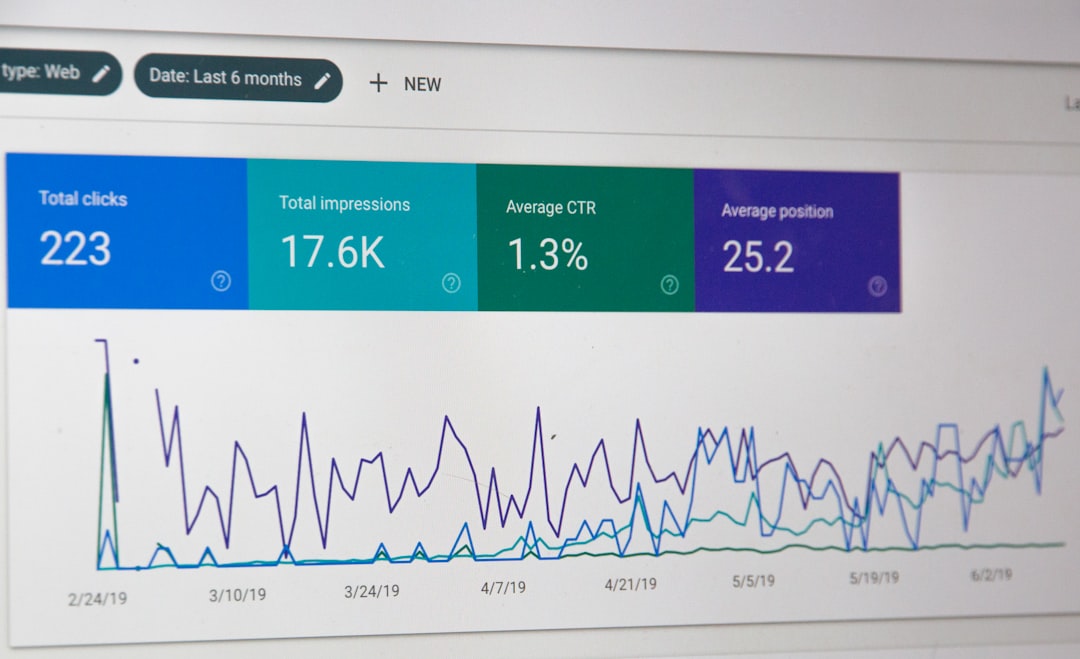
Low-hanging fruit SEO refers to keywords your site already ranks for — typically in positions 4 through 20 — that can be pushed higher with minimal effort. These aren’t aspirational targets. They’re rankings you’ve already earned partial credit for, sitting in Google Search Console right now, generating impressions but bleeding clicks to competitors above you. Capturing those missed clicks is the fastest ROI move in SEO because you’re not starting from zero. Google already trusts your page enough to show it. You just need to close the gap.
Compare that to chasing a brand-new keyword from scratch. You’d need to create content, earn backlinks, wait for indexing, and hope Google decides your page deserves a spot. That process takes months. With position 4 to 20 keywords, you’re skipping most of that timeline. The foundation exists. The opportunity is sitting in your data.
What Are Low-Hanging Fruit Keywords and Why They Matter
Think of your SEO efforts as a spectrum. On one end, you have keywords where you dominate — positions 1 through 3, pulling in steady traffic. On the other end, keywords where your pages barely register, buried on page four or deeper. The gold mine sits between those extremes.
The Sweet Spot: Position 4 to 20 Keywords
Why positions 4 through 20 specifically? The math tells the story.
According to Backlinko’s analysis of over 4 million Google search results, the number one organic result captures roughly 27.6% of all clicks. Position two drops to about 15.8%. By position three, you’re at 11%. Here’s where it gets painful: position ten — the bottom of page one — earns around 2.4% of clicks. And anything on page two? Most studies put that below 1%.
That CTR cliff between position 3 and position 10 represents an enormous volume of missed clicks. If you’re sitting at position 8 for a keyword generating 10,000 impressions per month, you might be pulling 150 clicks. Move that same page to position 3, and you’re looking at 1,100 clicks. Same page. Same keyword. Just a few positions higher.
| Position | Approximate CTR | Clicks per 10K Impressions |
|---|---|---|
| 1 | 27.6% | 2,760 |
| 3 | 11.0% | 1,100 |
| 5 | 5.1% | 510 |
| 8 | 1.7% | 170 |
| 10 | 2.4% | 240 |
| 15 | <1% | ~50-80 |
Keywords in positions 1 through 3 don’t need this treatment — they’re already performing. Keywords below position 20 often need significant work: new content, backlinks, maybe a complete page overhaul. But that middle band? That’s where a title tag rewrite, some content expansion, or a handful of internal links can move the needle fast.
Signs You Have Untapped GSC Opportunities
Three patterns signal that quick wins are waiting in your Search Console data:
High impressions, low clicks. Your page appears in search results thousands of times but almost nobody clicks. Either your ranking position is too low to attract attention, or your title and description aren’t compelling enough — both fixable problems.
Decent position, poor CTR. You’re ranking at position 6, but your click-through rate is half what position 6 typically earns. Something about your search snippet is underperforming, and a meta description or title rewrite could change that overnight.
Accidental rankings. Pages ranking for keywords you never intentionally targeted. This happens more often than people expect, and it’s often where the best low-hanging fruit SEO opportunities hide. If Google already associates your page with that query without you trying, imagine what happens when you actually optimize for it.
Step-by-Step Search Console Analysis to Uncover Quick Wins
Let’s get into the actual process. No theory — just the exact steps to pull actionable data from Google Search Console and turn it into a prioritized list of opportunities.
Setting Up Your Performance Report Filters
Open Google Search Console and navigate to the Performance report. Before you touch anything else, configure these settings:
-
Date range: Select the last 3 to 6 months. Shorter windows introduce noise from daily ranking fluctuations. Longer windows dilute recent trends. Three months is the sweet spot for most sites; six months if your traffic volume is lower.
-
Enable all four metrics: Click the boxes above the chart to activate Clicks, Impressions, CTR, and Average Position. You need all four visible — they work together. Clicks alone won’t tell you about opportunity. Impressions alone won’t tell you about performance.
-
Search type: Keep this on “Web” unless you have specific reasons to analyze image or video search separately.
-
Country filter (optional): If you serve a specific geographic market, filter to that country so your data isn’t muddied by irrelevant international impressions.
Exporting and Sorting Data for Position 4 to 20 Keywords
Click the “Queries” tab below the chart, then hit “Export” in the top right. Choose Google Sheets or Excel — whatever you’re comfortable working in.
Now the filtering begins:
- Sort or filter the “Position” column to show only rows where average position falls between 4.0 and 20.0.
- Sort the remaining rows by “Impressions” in descending order.
What you’re looking at now is a ranked list of keywords where you have visibility but aren’t maximizing it. The keywords at the top — high impressions, middling positions — are your biggest opportunities by raw volume.
A quick note: GSC’s “position” metric is an average. A keyword showing position 8.2 might fluctuate between position 5 and 12 across different queries and days. That’s fine. The average still tells you where the center of gravity sits.
Identifying Pages With High Impressions but Missed Clicks
Switch to the “Pages” tab in GSC before exporting, or cross-reference your query data with page-level data. You need to know which specific URL ranks for each keyword.
The metric to focus on here is the gap between expected CTR and actual CTR. If a page sits at average position 5 and the typical CTR for that position is around 5%, but your page only pulls 1.2%, that gap represents real missed clicks you can recover.
Calculate this in your spreadsheet:
Missed Click Potential = Impressions × (Expected CTR − Actual CTR)
A keyword with 8,000 impressions at position 5 with a 1.2% CTR instead of the expected 5% means roughly 304 clicks left on the table every month. That’s a concrete number you can act on.
If you’re looking to scale this kind of search console analysis across a large site with hundreds or thousands of pages, the approach outlined in our Programmatic SEO Playbook 2026 can help systematize the process.
Prioritizing Opportunities by Effort Versus Impact
Not all opportunities deserve equal attention. Build a simple scoring system in your spreadsheet:
- Impact score (1-3): Based on impression volume. High impressions = 3, medium = 2, low = 1.
- Proximity score (1-3): How close to page one? Position 4-10 = 3, position 11-15 = 2, position 16-20 = 1.
- Effort estimate (1-3): Quick title/meta fix = 1, content expansion needed = 2, major rewrite required = 3.
Priority = (Impact + Proximity) − Effort
The highest-scoring keywords are your starting list. These are the ones where a small push yields disproportionate returns.
How to Act on Your Findings and Move Rankings Up
Identifying GSC opportunities is half the battle. The other half is knowing exactly what to change on each page. Here’s what actually moves the needle for position 4 to 20 keywords.
Optimizing Title Tags and Meta Descriptions for Better CTR
Your title tag is the single most visible element in search results. For keywords where your position is decent but CTR lags, this is the first lever to pull.
Title tag improvements that work:
- Move the target keyword closer to the front of the title
- Add a specific number or year (“7 Methods,” “2025 Guide”)
- Include a power word that creates urgency or curiosity (“Proven,” “Exact,” “Complete”)
- Keep it under 60 characters so Google doesn’t truncate it
Meta description tactics:
- Directly address the searcher’s intent in the first sentence
- Include a clear benefit or outcome (“Save 4+ hours per week”)
- Add a soft call to action (“See the full breakdown”)
Here’s the leverage: if a keyword generates 15,000 impressions monthly and you improve CTR from 1.5% to 3.5%, that’s 300 additional clicks per month from a change that takes five minutes to implement. No new content. No link building. Just a better title.
Strengthening On-Page Content to Match Search Intent
For keywords where your position itself needs to improve (not just CTR), the page content is the battlefield. Open the top three results for your target keyword and audit what they cover that you don’t.
Common gaps to fill:
- Missing subtopics. If every top result covers a specific angle and your page skips it, add a section addressing it.
- Thin sections. A 100-word section on a subtopic that competitors cover in 400 words with examples signals to Google that your coverage is incomplete.
- Poor structure. Break up walls of text with descriptive H2 and H3 headings that include keyword variations naturally.
- Internal links. Link from other relevant pages on your site to the target page. This funnels authority and helps Google understand the page’s topical relevance. If you’re new to thinking about content strategy at scale, our welcome post covers foundational approaches worth reading.
One underrated tactic: check the “People Also Ask” boxes in Google for your target keyword. Each question represents a subtopic Google considers relevant. If your page doesn’t address those questions, add a section that does.
Tracking Progress and Iterating Monthly
Low-hanging fruit SEO isn’t a one-time project. It’s a recurring process.
Set a monthly calendar reminder to repeat the search console analysis described above. Rankings shift constantly — new keywords enter the position 4-20 range as your site grows, and previously optimized pages may need another round of refinement.
Track your targeted keywords in a dedicated spreadsheet or tab. Record the position and CTR at the time of optimization, then compare month over month. This creates accountability and helps you understand which types of changes produce the best results for your specific site.
After two or three monthly cycles, you’ll develop an intuition for which opportunities are worth pursuing and which ones are false positives. That pattern recognition compounds over time.
Real-World Example: Turning a Position 12 Keyword Into a Top 3 Result
Let’s walk through a realistic scenario to make this method concrete.
The starting point: A blog post about email marketing automation ranks at average position 12 for the query “email automation workflows.” GSC shows 5,200 monthly impressions and just 22 clicks — a CTR of 0.42%. For position 12 (page two), that CTR is actually normal. The problem is the position itself.
The analysis: Checking the top results for “email automation workflows” reveals that the top three pages all include step-by-step workflow templates, visual diagrams, and specific tool-agnostic examples. The blog post in question covers the topic conceptually but lacks actionable templates.
The changes made:
- Title tag rewrite: Changed from “Understanding Email Automation Workflows” to “5 Email Automation Workflows You Can Set Up Today (With Templates)”
- Content expansion: Added three specific workflow templates with trigger-action-outcome breakdowns. Expanded word count from 900 to 2,100 words.
- Internal linking: Added links from four related blog posts that previously had no connection to this page.
- Structure improvement: Broke the content into clear H2 sections matching the workflow types, making it scannable and snippet-friendly.
The result after 6 weeks: Position moved from 12 to 3. CTR jumped to 8.1%. Monthly clicks went from 22 to 421. That’s a 19x increase in traffic from a page that already existed — no new URLs created, no backlink campaigns, no paid promotion.
That’s the power of targeting missed clicks on position 4 to 20 keywords. The infrastructure was already there. It just needed sharpening.
Frequently Asked Questions About Low-Hanging Fruit SEO
How Long Does It Take to See Results From These Optimizations?
Most on-page changes reflect in rankings within 2 to 8 weeks. Title tag and meta description updates often show CTR improvements within days of Google recrawling the page. Content expansions typically take 3 to 6 weeks to fully impact position. This is dramatically faster than building new content from scratch, which can take 3 to 6 months to gain meaningful traction.
What Is a Good CTR Benchmark for Each Position?
General benchmarks based on Advanced Web Ranking’s CTR study:
| Position | Desktop CTR | Mobile CTR |
|---|---|---|
| 1 | ~30-35% | ~25-28% |
| 2 | ~15-18% | ~13-15% |
| 3 | ~10-12% | ~9-11% |
| 5 | ~5-7% | ~4-6% |
| 10 | ~2-3% | ~1.5-2.5% |
These vary significantly by industry and query type. Informational queries tend to have lower CTRs across all positions due to featured snippets capturing clicks. If your CTR falls well below these ranges for a given position, that’s a clear signal to optimize your search snippet.
Should I Focus on Branded or Non-Branded Keywords?
Filter out branded terms during your analysis. Branded queries (searches containing your company or product name) typically already have high CTR because the searcher is specifically looking for you. Non-branded keywords are where the real growth opportunity lives — these represent people who don’t know you yet but are searching for what you offer.
How Many Keywords Should I Target at Once?
Start with 5 to 10 of your highest-priority opportunities per month. Trying to optimize 50 pages simultaneously dilutes your effort and makes it nearly impossible to attribute which changes drove which results. A focused batch of 5-10 gives you enough volume to see patterns while keeping the workload manageable.
Can I Use This Method for New Websites?
Yes, but patience is required. New sites need at least 3 to 6 months of GSC data before meaningful patterns emerge. Before that threshold, impression counts are too low and position averages too volatile to draw reliable conclusions. The method works best for sites with established indexing and at least a few dozen keywords already generating impressions.
What If My Pages Rank for Keywords I Didn’t Target?
This is often where the best opportunities hide. If a page accidentally ranks at position 14 for a relevant keyword you never optimized for, Google is already telling you the page has topical relevance. Intentionally adding that keyword to your title, headers, and body content can produce fast gains because you’re reinforcing a signal Google already detected.
Do I Need Paid Tools or Is Google Search Console Enough?
GSC plus a spreadsheet is sufficient for this entire method. Paid SEO tools add convenience — keyword difficulty scores, competitor analysis, historical volume data — but they’re not required to find and act on low-hanging fruit. The data that matters most (your actual impressions, clicks, CTR, and positions) lives exclusively in Search Console. No third-party tool has that data with the same accuracy.
Your Next Step: Run Your First Search Console Audit Today
Here’s the process distilled:
- Export your GSC query data for the last 3-6 months, filtered to positions 4-20, sorted by impressions.
- Calculate missed click potential by comparing your actual CTR against expected CTR for each position.
- Prioritize 5-10 keywords using the impact-proximity-effort scoring framework.
- Optimize each page — rewrite titles, expand content, add internal links, align with search intent.
- Review monthly and repeat.
The biggest mistake isn’t choosing the wrong keywords to optimize. It’s ignoring the data you already have. Every day you don’t look at your Search Console performance report, you’re leaving clicks — and revenue — for competitors who rank just a few spots above you.
Set a recurring calendar reminder. First Tuesday of every month. Thirty minutes. That’s all it takes to keep your low-hanging fruit SEO pipeline full and your traffic growing without creating a single new page.